

On this page
Overlay
Choose your current account or credit card to see the different ways to earn Rewards.
Exchange your Rewards
As soon as your Rewards are worth £5 or more, you can:
Information Message
The money can take up to five working days to show in your account.
Exchange for money
Pay them into your current account, savings account or credit card.
Information Message
Exchange for e-gift codes
With popular brands like Amazon, B&Q, Costa, IKEA and Marks & Spencer.
Information Message

Trade up for Avios or Emirates Skywards Miles
Make your Rewards go further and use towards your next travel adventure.
Information Message
Donate to a charity
Some popular options are Cancer Research UK, Alzeimer’s Society & British Heart Foundation.
Information Message
Log in to access your Rewards
Check your Rewards balance, browse our latest partner offers, and exchange your Rewards.


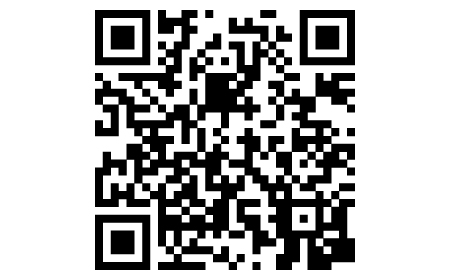
Accessing MyRewards is easy
- On your mobile or tablet, open the camera and point your device at the QR code.
- A link will pop up, tap this, and you’ll be taken straight to MyRewards in your Royal Bank mobile banking app.
- If the QR code is not working for you, use this MyRewards link to get into your app.
- Or you can log in using Digital Banking and use the MyRewards section to access MyRewards.
QR code not working?
You can download the app and get into MyRewards by following these instructions:
- On your mobile or tablet, go to the App Store if using Apple or Google Play if using Android.
- Search for 'Royal Bank Mobile Banking'.
- Tap to download the app.
App available to personal and business customers aged 11+ using compatible iOS and Android devices and a UK or international mobile number in specific countries.
Accessing MyRewards is easy
- On your mobile or tablet, open the camera and point your device at the QR code.
- A link will pop up, tap this, and you’ll be taken straight to MyRewards in your Royal Bank mobile banking app.
- If the QR code is not working for you, use this MyRewards link to get into your app.
- Or you can log in using Digital Banking and use the MyRewards section to access MyRewards.

QR code not working?
You can still download the app and get into MyRewards by following these instructions:
- On your mobile or tablet, go to the Google Play store.
- Search for 'Royal Bank Mobile Banking'.
- Tap to download the app.
App available to personal and business customers aged 11+ using compatible iOS and Android devices and a UK or international mobile number in specific countries.
Accessing MyRewards is easy
- On your mobile or tablet, open the camera and point your device at the QR code.
- A link will pop up, tap this, and you’ll be taken straight to MyRewards in your Royal Bank mobile banking app.
- If the QR code is not working for you, use this MyRewards link to get into your app.
- Or you can log in using Digital Banking and use the MyRewards section to access MyRewards.

QR code not working?
You can still download the app and get into MyRewards by following these instructions:
- On your mobile or tablet, go to the App Store.
- Search for 'Royal Bank Mobile Banking'.
- Tap to download the app.
App available to personal and business customers aged 11+ using compatible iOS and Android devices and a UK or international mobile number in specific countries.
MyRewards Terms and Conditions
We do our best to ensure everyone is aware of their account terms and conditions, please take some time to review, print and/or save a copy of these.
MyRewards FAQs

Explore our Credit Cards
Want Rewards on your everyday spending? Why not apply for one of our Reward Credit Cards
- A Reward credit card. Representative 31.0% APR (variable). Annual fee applies - but we'll refund it if you have a Reward current account.
- A Reward Black credit card. Representative 40.7% APR (variable). Annual fee applies - but we'll refund it if you have a Premier Reward Black current account.
- A Travel Reward credit card. Representative 27.9% APR. (variable). No Annual fee applies.
Eligibility criteria applies.
Reward
£2 monthly fee
- No foreign transaction fees on debit card spend abroad
- £4 back in Rewards per month when you have 2 direct debits held on the account
- Earn Rewards through everyday spending when you spend with one of our retailers
Information Message
Reward Silver
£12 monthly fee
- European travel insurance
- Mobile phone insurance
- Health benefits
- Travel eSIM
- tastecard membership
- Plus, all the benefits of the Reward account
Information Message
Reward Platinum
£23 monthly fee
- Worldwide travel insurance
- Mobile phone insurance
- UK car breakdown cover
- Health benefits
- Travel eSIM
- tastecard membership
- Plus, all the benefits of the Reward account
Information Message
Premier Reward
£2 monthly fee
- No foreign transaction fees on debit card spend abroad
- £9 back in Rewards per month when you have 2 direct debits held on the account
- Earn Rewards through everyday spending, when you spend with one of our retailers
Premier eligibility criteria applies
Information Message
Premier Reward Black
£39 monthly fee
- Worldwide travel insurance
- Mobile phone insurance
- UK and European car breakdown cover
- Health benefits
- Worldwide airport lounge access
- Travel eSIM
- Travel & lifestyle concierge
- Plus, all the benefits of the Premier Reward account
Premier eligibility criteria applies
Information Message
Already a Reward account customer? Manage your account below


Change or switch your account
It's easy to change your account type, or switch in a current account held elsewhere, once you log in. Explore our range of accounts and choose the one that's right for you.
Information Message
Specific account eligibility and monthly fee may apply. App available to customers aged 11+ with compatible iOS and Android devices and a UK or international mobile number in specific countries.