

Making Tax Digital means businesses must use software recognised by HMRC to manage taxes. Here’s what this means for you, and how to get that software for free with us.
Overlay

Making Tax Digital
Your software guide, to stay ahead of new tax rules

An introduction to Making Tax Digital
Making Tax Digital (MTD) is a UK government initiative that means businesses will be required to manage taxes and VAT digitally.
Digital records must be kept using software that’s approved by HMRC. Then, businesses will submit an online final declaration instead of the annual Self-Assessment.
MTD rules are already in place for VAT-registered businesses, and it’s gradually being implemented for Income Tax too.
Want a bit more information on what Making Tax Digital means for you? Check out our MTD hub
Let’s talk about software

You need MTD-compatible software that’s recognised by HMRC
As part of your new MTD obligations, you must use digital software to manage and submit tax records.
Here’s what your software must do:
- Store, create and correct digital records for property and self-employed income and expenses.
- Send quarterly tax updates and yearly tax returns directly to HMRC.
HMRC keeps a list of all recognised MTD software providers. If you’re starting with a new provider, keep in mind that many charge monthly fees.

There are two broad types of software you could use
- End-to-end accounting software: for example, FreeAgent. This software helps with bookkeeping, tax, cashflow and invoicing. It’s HMRC-recognised and is free for our business customers.
- Bridging software: this connects spreadsheets directly to HMRC, but it doesn’t fulfil other aspects of MTD on its own - you may need support from an accountant.
How FreeAgent could help
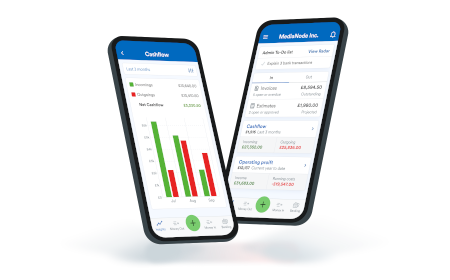
FreeAgent is an all-in-one accounting package that’s recognised by HMRC for MTD. It’s free for all Royal Bank or Mettle business banking customers, and here’s how it could help:
Simpler tax submissions - it auto-populates part of your tax submissions with your recorded income and expenses. You can add any additional income and tax relief, then submit directly to HMRC.
Connecting with your phone - manage invoices and expenses by uploading receipts from your phone. And, you can also sync your business bank account.
Performance and cashflow - get financial performance insights including comparisons with similar businesses, and 90-day cashflow forecasts.
Information Message
FreeAgent is free with a Royal Bank or Mettle business account. You must make at least one transaction a month from your Mettle account to qualify. Optional add-ons may be chargeable.
Step 1: open a business account
Our customers could get MTD-compatible software for free. Explore our bank accounts to find one that best suits your business needs.
Information Message
Step 2: get software for free
To stay compliant with MTD, you need HMRC-recognised software. FreeAgent’s software is free for all Royal Bank or Mettle business customers.
Information Message
Step 3: register with HMRC
Based on when MTD applies to you, you’ll need to register with HMRC. Once they confirm your registration, you can get started.
Information Message
Step 4: submit digital records
You’ll need to keep digital records on FreeAgent or another MTD-compatible software. Then, provide quarterly updates and a final declaration to HMRC.
Information Message